To find a route from CDG to a Metro station use the Paris Metro Journey Planner, operated by the Paris public transit authority – RATP.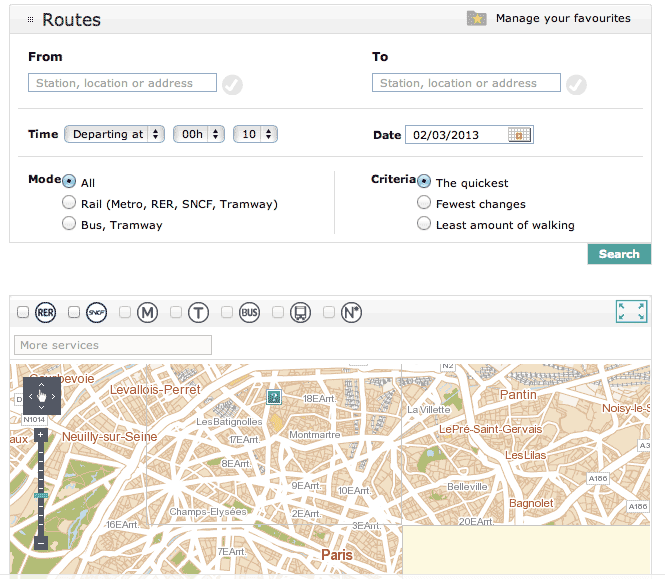
Find a route from CDG to Paris Metro Station
Here is a step by step example of finding a route from CDG Airport Terminal 1 to St. Sulpice Metro station in Paris.
Step One – Route Planner
First, open up the Paris Metro Route Planner in a web browser. You’ll see a page similar to the one shown here.
Step Two – Departure Metro RER Station
Start typing the French name of the station and results will pop-up. For CDG Airport – enter “Aeroport Charles” which will show a list of matches.
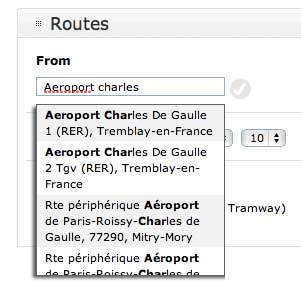
If you’re arriving at Terminal 1 or Terminal 3 of CDG, choose the first result: Aeroport Charles de Gaulle 1 (RER), Tremblay-en-France.
If you’re arriving at CDG Terminal 2, select the second result: Aeroport Charles de Gaulle 2 Tgv (RER), Tremblay-en-France.
Both of the above are RER B train stations at CDG Airport.
Step Three – Destination Metro Station
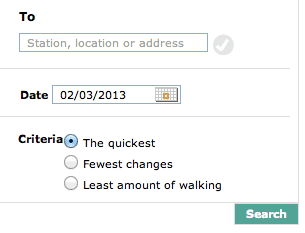
Next, we’ll select a Destination station. In this example we’re going to République Metro station. Select the Station radio button and type Republique in the text box below.
Step Four – Departure Time & Date
There is an option near the bottom of the Route Planner that allows you to enter the Date and Time that you plan on making this journey.

It’s important to specify the same day of the week and approximate time of day (in 24 hour clock) that you will be making this trip to get accurate results. You do not have to specify the exact date & time of travel if this information is not available. If you’re not sure of when you’re traveling, simply choose a time and day that makes sense, i.e. don’t use a time in the middle of the night. Somewhere between 8am to 9pm (21 hours) will give you good results.
Step Five – Options
Mode & Criteria
Mode specifies which types of transportation: Rail, Bus & street cars/trams or both. For simplicity and reduced transfers, I choose Rail.
For Criteria, there are options to minimize transfers between lines using Fewest Changes or minimize walking distance by selecting Least amount of walking. I’ve tested these options out and they’re not exactly great. Fewest changes can have you literally walking 1-2 kilometers to get to your final destination, just to avoid a transfer. Not smart. For the moment, I suggest leaving Criteria on “The quickest” option.
Step Six – Review Route Planner Results
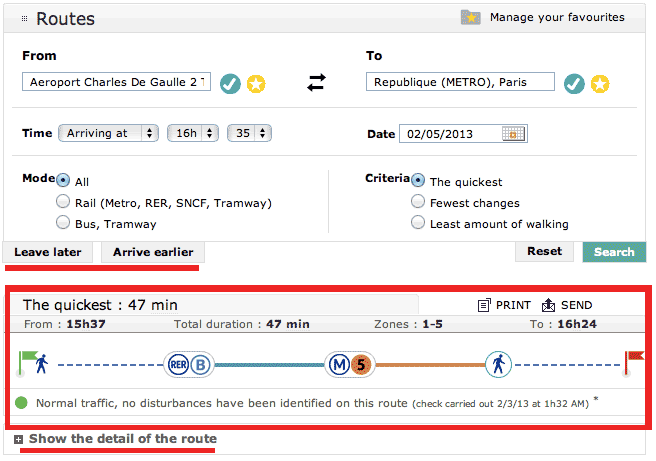
The Paris Metro RER Route Planner results will up beneath the search panel similar to this (red highlights added by me for discussion below):
Examining Route Planner Results
Looking closer at the results we see that the Paris Metro RER Route Planner gives total Travel Time beside your chosen Criteria, in this case: The quickest: 47 min for the journey (from CDG Airport Terminal 2 to Republique (METRO). The journey requires some walking, taking the RER B train, taking Metro 5 and some walking to get to the final destination.
The above 47 min. example journey starts from Airport CDG 2 station at 15h37 (3:37 PM), passes through Paris fare Zones 1-5, and will have the traveler arriving at 16h24 (4:24 PM). The fare Zones 1-5 determine how much trip will cost, in this case 11.80€, which will be the same cost for arriving anywhere within the Paris Metro system from Airport CDG.
Just above the results box are two buttons labeled Leave later and Arrive earlier. These allow you to shift the search results to the next closest trains either earlier (Arrive earlier) or later (Leave later) to better accommodate your schedule.
Below the search result is a link entitled “Show the detail of the route“. Clicking this link will expand the results to show you important information about your suggested route. An example is provided here:
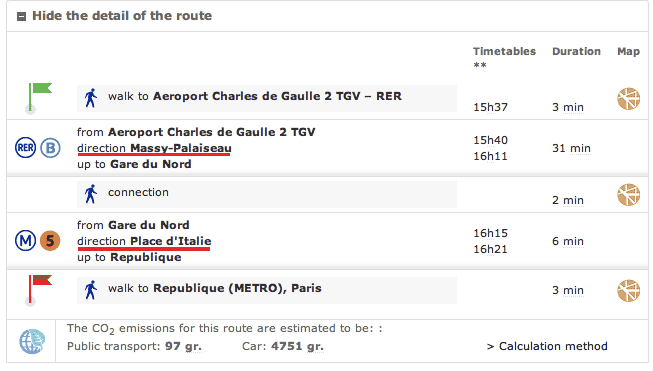
The key information on the details page (which I’ve highlighted by red underlines) are the directions you need to the take the two trains, first for the RER B train then the Metro 5 subway line. The direction tells you which train platform you’ll need to travel in the correct direction.
The terminus station used to signify direction of travel for trains leaving CDG is not important if you’re destination is within city centre Paris, since the RER B train stops at all RER B stations within Paris itself: Gare du Nord, Chatelet Les Halles, St Michel Notre Dame, Luxembourg, Port Royal, Denfert Rochereau, and Cité Universitaire.
If you’re at Aeroport CDG 1 train station, you’ll need to get on the train going towards Paris and not the train going to CDG Terminal 2 train station. For the example above, the RER B happens to be terminating at Massy-Palaiseau in southern Paris. Not very important since we’ll be getting off at Gare du Nord. At the airport train stations, on the train platforms, you can verify the direction of the RER train by looking at the overhead television screens which show the direction and departure time of the train.
See the following photo guide articles for more information on catching the RER B train from Paris CDG Airport to Paris city center: CDG Airport Terminal 1 to Paris and CDG Airport Terminal 2 to Paris.
In the above example, the second leg of the journey is completed on a different type of train: the Paris Metro, Line 5. In this step, direction is very important. Every Paris Metro line will have two (or more) directions which are specified by the name of the last station on the line (the terminus station) at that end of the line. In this case, the direction is Place d’Italie. The station we’re after is République, which is between Gare du Nord and Place d’Italie stations.
When transferring from the RER B train line to Metro Line 5 at station Gare du Nord, one would follow signs within Gare du Nord that show Metro Line 5 and the direction Place d’Italie, if the sign you’re reading denotes directions. Not all signs within Metro stations show line directions (to save space) and some signs show both directions, since you’re so far away from the actual Metro train platforms that the path you’re on leads to both sides (and directions) of the Metro line. Only when you get close enough to the two train platforms, each heading in opposite directions, will the Metro signs start specifying a single direction/terminus station. For this particular trip, the opposite direction for Metro Line 5 is Bobigny Pablo-Picasso, but we’re after Place d’Italie.
The Duration column on the right specifies walking times (3 min, 2 min, 3 min) and train travel times (31 min, 6 min) for the journey.
The final piece of information on the Route Planner results is the Paris Fare Zones you’ll be crossing during your journey. This tells you the approximate cost of the trip and the type of ticket required for the journey.
In this case, CDG Airport to Paris (any Metro station) is a special fare and is priced as such: 11.80€. For journeys purely within the Paris Metro system, the Fare Zones are 1-2, and will require only a single Paris Metro Ticket at a current cost of 2.15€ ( as of Jan. 4, 2024). Any journeys beyond zones 1-2 will require additional Paris Metro Tickets (Ticket t+) good for the Metro and Bus, or special station to station priced tickets called Billet Ile-de-France. Tip: Billet Ile-de-France tickets, when arriving or departing in central Paris, such as on this trip from CDG Airport to Paris, are good for both the Paris RER and the Paris Metro; you’ll use this single ticket on both types of trains to complete your journey.
Enjoy your trip!
What Next?
- Search:
- Ask a question


I want to support Ben